How B2B Ad Agencies Speed Up Reporting and QA
B2B ad agencies can speed up reporting and QA with cleaner data, automated checks, AI summaries, and a stronger delivery rhythm.
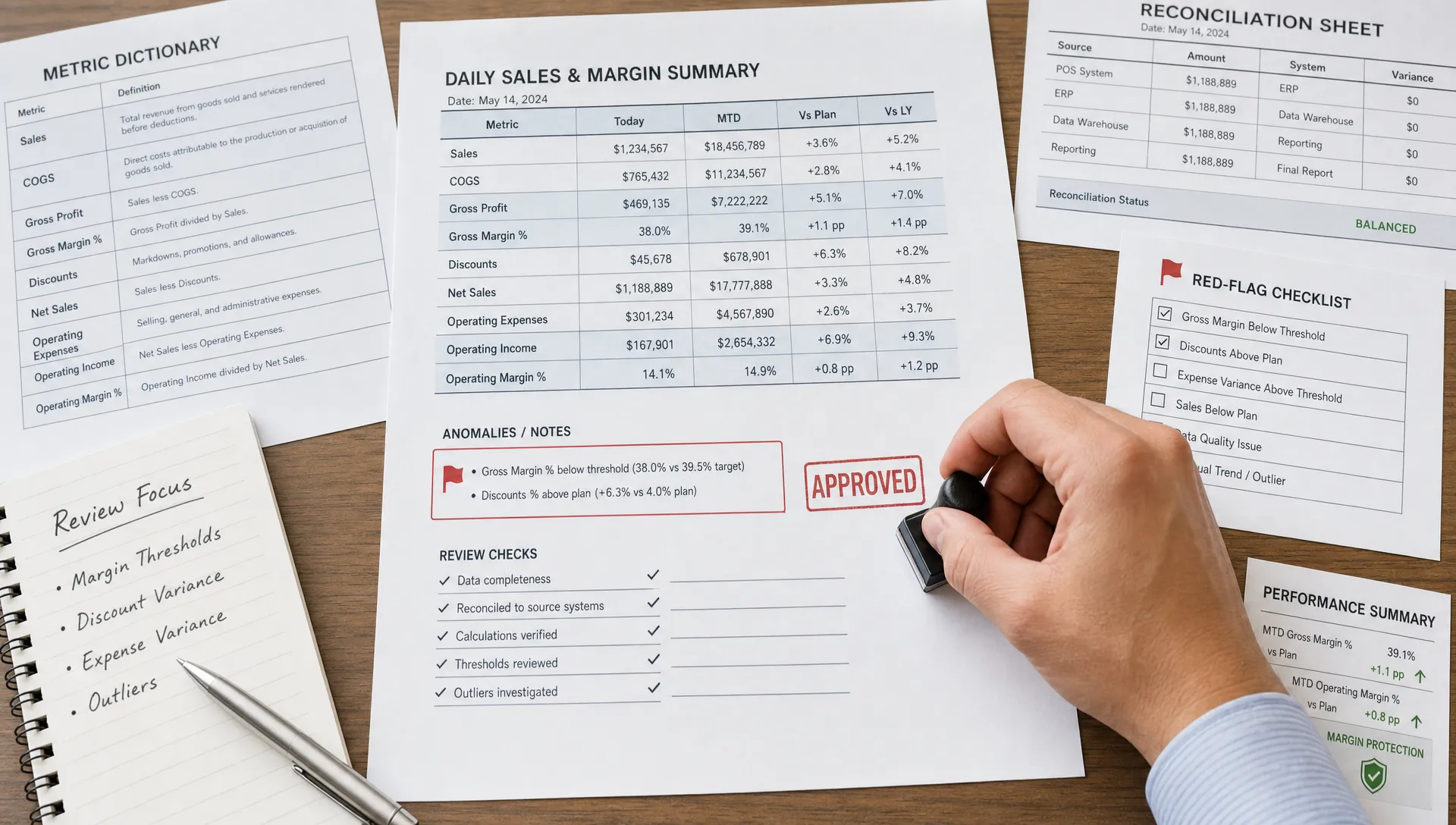
Reporting and QA are often treated as admin work, but for B2B ad agencies, they are margin work.
Every late report, broken dashboard, mismatched conversion count, or missed campaign setting creates a hidden cost. Account managers spend hours reconciling numbers. Media buyers get pulled into client-facing explanations. Leadership loses visibility into whether delivery is actually profitable. Worst of all, clients start questioning the agency’s attention to detail.
The problem is rarely that the team is lazy or under-skilled. It is usually that reporting and QA are built on manual habits instead of an operating system.
If every client has a different report format, every channel has a different naming convention, and every QA review depends on the memory of one senior strategist, speed will always come at the expense of accuracy. The fix is not “more dashboards” or “use AI everywhere.” The fix is a tighter delivery system that standardizes inputs, automates repetitive checks, and keeps humans focused on judgment.
Why Reporting and QA Slow Down B2B Ad Agencies
B2B advertising work has more operational complexity than many consumer campaigns. Sales cycles are longer, conversion events are less straightforward, and “lead quality” often matters more than lead volume. A campaign might generate form fills this week, sales-qualified opportunities next month, and closed revenue next quarter.
That complexity makes reporting and QA harder in several ways.
First, data comes from too many places. Paid media platforms, CRMs, call tracking tools, landing page builders, spreadsheets, sales notes, and analytics tools all tell a partial story. When the reporting process depends on someone manually stitching those pieces together, errors are inevitable.
Second, account teams often report on metrics that were never clearly defined. One person says “conversion” and means every form submission. Another means demo requests only. A client may care about pipeline, but the agency report still leads with clicks and cost per lead.
Third, QA is usually performed too late. Many agencies check campaigns right before launch or right before a client report goes out. At that point, the team is catching problems after time has already been wasted.
A faster process starts by moving reporting and QA upstream. Instead of checking work after the fact, the agency builds quality gates into the workflow itself.
Create a Reporting Source of Truth Before You Automate
Automation makes a good process faster. It makes a messy process messier.
Before a B2B ad agency automates reporting, it needs a clear reporting source of truth. This does not have to be a massive data warehouse on day one. It can start as a structured reporting brief, a metric dictionary, and a standardized campaign taxonomy that every team member follows.
At minimum, define these elements for every client:
- Metric definitions: What counts as a lead, MQL, SQL, opportunity, meeting booked, or qualified conversion.
- Date logic: Whether performance is reported by click date, conversion date, opportunity creation date, or close date.
- Channel naming rules: How campaigns, ad groups, audiences, creatives, and offers are named.
- Attribution expectations: What the agency can confidently claim, what is directional, and what requires client CRM validation.
- Client priorities: Which three to five numbers actually matter in the monthly narrative.
This is the layer many agencies skip. They jump straight into templates and dashboards without agreeing on the operating language behind the report.
If the agency’s campaign launch process is inconsistent, reporting will keep turning into cleanup. That is why it is worth reviewing what B2B advertising agencies should systemize first before adding more automation to the back end.
Here is a simple way to think about the shift:
| Reporting friction | System fix | Result |
|---|---|---|
| Every client has a custom spreadsheet | Standard reporting brief and metric dictionary | Less interpretation work |
| Campaign names vary by team member | Shared taxonomy and validation rules | Cleaner data pulls |
| Account managers rewrite commentary from scratch | Structured narrative templates | Faster first drafts |
| QA happens right before launch | Built-in stage gates | Fewer late corrections |
| Reports focus on too many metrics | Client-specific KPI hierarchy | Clearer client conversations |
The goal is not to make every client report identical. The goal is to make the underlying structure consistent enough that customization becomes strategic, not manual.
Automate the Data Pull, Not the Accountability
The biggest time drain in agency reporting is usually not analysis. It is collection, formatting, reconciliation, and screenshot hunting.
Those are the jobs automation should handle first.
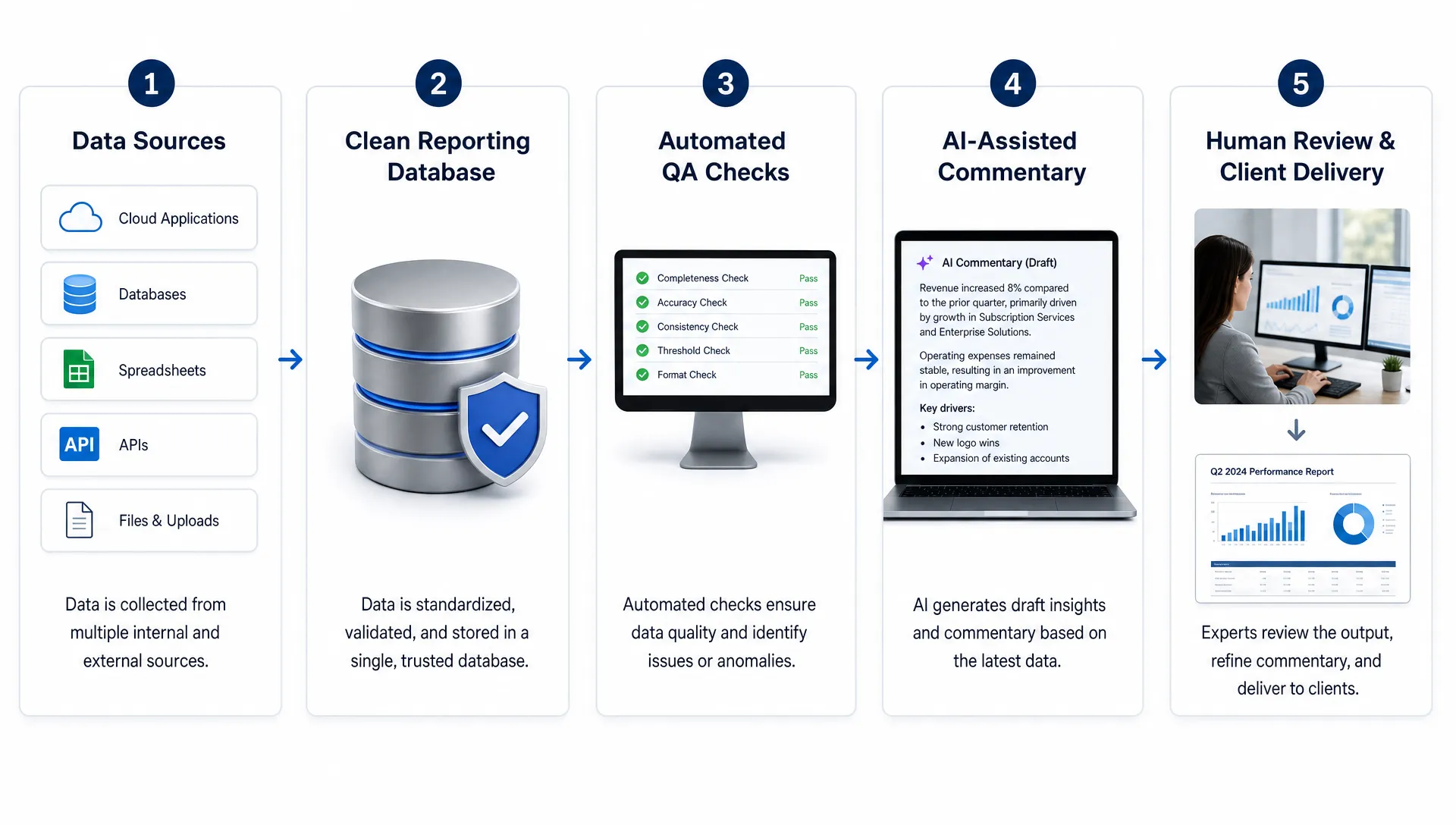
A strong reporting system can automatically pull data from ad platforms, analytics tools, CRM exports, and internal trackers into a consistent structure. From there, the team can apply checks before the data ever reaches a client-facing dashboard or deck.
For B2B ad agencies, the most useful automation layer is often a “data spine” that connects the same core fields across clients and campaigns. This might include spend, impressions, clicks, conversions, lead source, lifecycle stage, opportunity amount, and campaign owner. Once that spine exists, reports become easier to refresh, compare, and QA.
What should not be automated away is accountability. A dashboard can calculate cost per opportunity, but a strategist still needs to explain why it changed. AI can summarize performance, but an account lead still needs to decide what the client should do next.
A practical automation sequence looks like this:
- Pull platform and CRM data on a schedule.
- Normalize naming conventions and date ranges.
- Flag missing values, sudden changes, and metric mismatches.
- Generate a draft performance summary.
- Route the report to a human owner for review and client-ready interpretation.
This is also where white-label reporting becomes far more scalable. Instead of rebuilding slides manually for each client, agencies can standardize the reporting engine and customize the insights layer.
Move QA Into the Delivery Workflow
QA should not be a final checklist someone rushes through when the campaign is already due.
Fast agencies treat QA as a series of quality gates. Each gate catches a different type of risk before it becomes expensive. For example, intake QA checks whether the client has supplied the right offer, audience, tracking access, and CRM definitions. Build QA checks whether the campaign structure, budgets, UTMs, conversion events, and creative assets match the approved plan. Reporting QA checks whether the numbers reconcile and whether the commentary is supported by the data.
This matters because B2B campaigns are not interchangeable. A SaaS demo campaign, a professional services lead-gen campaign, and a high-ticket equipment campaign can all require different QA logic. For example, an agency running campaigns for a niche provider like a crypto mining in UAE specialist would need to pay close attention to product categories, regional claims, lead qualification criteria, and compliance-sensitive wording, not just clicks and conversions.
That is the real value of operational QA. It is not just “did someone proofread the ad?” It is “does the campaign match the business model, funnel stage, audience promise, and measurement plan?”
A mature QA system usually separates checks into three categories:
| QA category | What it catches | Example |
|---|---|---|
| Hard stops | Errors that should block launch or reporting | Missing conversion tracking, wrong URL, broken form |
| Warnings | Issues that need review but may not block delivery | CPL spike, unusual drop in impressions, low lead volume |
| Human judgment | Contextual questions automation cannot fully answer | Whether the recommendation fits client strategy |
This structure speeds the process because the team is not treating every issue equally. A broken form deserves immediate escalation. A week-over-week click drop might simply need context. A recommendation about budget reallocation needs a human strategist.
Use AI for Commentary, But Ground It in Evidence
AI can save hours in reporting when it is used correctly. The best use case is not asking AI to “analyze the account” with vague instructions. The better use case is feeding it clean, structured data and asking it to produce a first-pass narrative within strict boundaries.
A useful AI reporting prompt might ask for:
- The three biggest changes versus the previous period.
- The most likely drivers based only on the data provided.
- Questions the account manager should verify before presenting.
- A client-ready summary in the agency’s preferred tone.
- Recommendations labeled as either data-backed or hypothesis-based.
The key rule is simple: no claim without evidence. If the AI says lead quality improved, the report should show the CRM or sales feedback data behind that claim. If the AI says a campaign underperformed, it should reference the relevant spend, conversion, or pipeline movement.
This is where many agencies get AI wrong. They use it to write polished commentary on top of unreliable data. That creates confident-sounding reports that may not be true. A better system uses AI after the data has been cleaned and checked.
For agencies trying to make the broader delivery machine more efficient, reporting automation should sit inside a larger operations plan. The principles are similar to the ones used to improve delivery efficiency across B2B marketing firms: standardize the repeatable parts, automate routine handoffs, and reserve expert attention for decisions that affect client outcomes.
Build a Weekly Reporting and QA Rhythm
Speed does not come from one big reporting day. It comes from a rhythm that prevents reporting debt from piling up.
Many agencies wait until the end of the month to reconcile issues that started in week one. By then, the team has to remember why spend shifted, why a campaign paused, why a lead source changed, or why CRM data does not match the ad platform.
A better approach is to run lightweight QA throughout the week.
| Timing | Operational focus | Owner |
|---|---|---|
| Monday | Confirm data syncs, tracking status, spend pacing, and campaign anomalies | Media or ops lead |
| Tuesday | Review lead quality signals, CRM movement, and open client blockers | Account manager |
| Wednesday | Draft insights and flag questions for strategist review | Reporting owner |
| Thursday | Finalize client-facing narrative and recommendations | Strategist or account lead |
| Friday | Log recurring issues and update SOPs or automation rules | Ops owner |
This cadence prevents the “Friday report scramble” that drains agency teams. It also gives leadership better visibility into where delivery is breaking.
If the same QA issue appears repeatedly, it should become an automation rule, SOP update, or onboarding requirement. If the same client report always takes twice as long, the agency should investigate whether the scope, data access, or client expectations are unclear.
That is how reporting becomes an operational feedback loop, not just a client deliverable.
Measure the Reporting Process Itself
Agencies often measure campaign performance but fail to measure delivery performance. If reporting and QA consume too much time, leadership needs numbers that reveal where the margin is leaking.
Start with a few operational metrics:
| Metric | What it tells you | Why it matters |
|---|---|---|
| Time to first draft | How long it takes to produce a usable report | Shows manual reporting burden |
| Revision rate | How often reports require major edits | Reveals unclear standards or poor data quality |
| QA escape rate | How many errors reach the client | Measures quality risk |
| Manual touch count | How many human steps are required | Identifies automation opportunities |
| On-time delivery rate | Whether reports go out as promised | Protects client trust |
| Exception volume | How many anomalies require investigation | Shows where systems need better rules |
These metrics do not need to be perfect at first. Even a simple monthly review can reveal patterns quickly.
For example, if reports are always late because CRM data is missing, the answer is not to push account managers harder. The answer is to fix onboarding, access, data mapping, or client responsibility agreements. If QA errors keep appearing in UTMs, the answer may be a naming generator, validation script, or launch checklist update.
This is also how agencies protect margin. The work that looks like “just reporting” often exposes deeper operational gaps in onboarding, campaign setup, client communication, and team handoffs. Strong agency marketing systems that protect your margin make these gaps visible before they become profit leaks.
Common Mistakes That Keep Reporting Slow
The first mistake is automating before standardizing. If your data definitions, naming rules, and client KPI hierarchy are inconsistent, automation will only help you produce inconsistent reports faster.
The second mistake is building dashboards that no one uses. A dashboard should answer recurring questions. If it becomes a dumping ground for every metric available, account teams will still need to build a separate narrative manually.
The third mistake is treating QA as a person instead of a process. Many agencies depend on one senior team member to “catch everything.” That works until the agency grows, the person gets overloaded, or a new team member misses context. A process can be taught, measured, and improved.
The fourth mistake is using AI without boundaries. AI can summarize, compare, and rephrase. It should not invent causes, overstate attribution, or make recommendations that are not supported by the available data.
The fifth mistake is failing to close the loop. When an error is found, the agency should not only fix that one report. It should ask why the error happened and whether the workflow can prevent it next time.
The Practical Path to Faster Reporting and QA
B2B ad agencies do not speed up reporting by asking teams to work faster. They speed it up by making the work easier to do correctly.
That usually means:
- Standardizing definitions, campaign naming, and client reporting briefs.
- Automating data collection, normalization, and anomaly detection.
- Building QA checks into intake, build, launch, optimization, and reporting stages.
- Using AI for structured first drafts, not unsupported conclusions.
- Measuring delivery performance alongside campaign performance.
The payoff is bigger than fewer late nights. Faster reporting gives account teams more time for client strategy. Better QA reduces rework and protects trust. Cleaner systems make it possible to grow without adding headcount every time the client roster expands.
In other words, reporting and QA are not side tasks. They are part of the agency’s delivery engine.
Frequently Asked Questions
How can B2B ad agencies reduce reporting time quickly? Start by standardizing metric definitions, campaign naming, reporting templates, and client KPI priorities. Then automate repetitive data pulls and use QA rules to flag missing data, tracking issues, and unusual performance changes before the report is drafted.
Should agencies use AI to write client reports? Yes, but only after the data has been cleaned and checked. AI is useful for summarizing trends, drafting commentary, and identifying questions for review. A human strategist should still validate the narrative and approve recommendations.
What should be included in a campaign QA checklist? A strong QA checklist should cover tracking, URLs, UTMs, budgets, audience settings, creative approvals, landing pages, conversion events, CRM mapping, compliance concerns, and alignment with the client’s campaign brief.
Why do agency reports take so long even with dashboards? Dashboards show data, but they do not automatically create context. Reports still take too long when metrics are undefined, data sources do not reconcile, commentary is written from scratch, or QA happens only at the end.
What is the best first automation for reporting and QA? The best first automation is usually data collection and validation. Pulling performance data into a consistent structure and flagging obvious issues saves time without removing human judgment from strategy.
Want Reporting and QA to Stop Eating Your Margin?
Archer Scaling AI installs and runs the AI ops layer for B2B marketing agencies that want better delivery margin without another hire. The work starts with a paid Margin Teardown: a roadmap and three automation moves, or it is on me.
If reporting, QA, onboarding, CRM updates, or content operations are slowing your team down, you can see the actual system running live before you commit. Start with Archer Scaling AI and find the automation moves that will protect your agency’s margin first.