Research Marketing Workflows You Can Automate Now
Automate research marketing workflows that drain agency margin, from ICP research to reporting, without losing human judgment or quality.

Most B2B marketing agencies do not lose margin because the team cannot think strategically. They lose margin because the same research has to be rebuilt for every client, campaign, brief, report, and sales handoff.
A strategist checks the ICP again. A copywriter hunts for customer language again. An account manager pulls reporting context again. A media buyer explains performance changes again. None of that feels like waste in the moment, because it is useful work. But across 10, 20, or 50 clients, manual research becomes an invisible delivery tax.
That is where research marketing workflows are a strong automation target. Not because AI should replace judgment, but because agencies need a better way to collect, structure, summarize, route, and reuse evidence.
The goal is simple: automate the repetitive movement and synthesis of research so your team spends more time deciding what matters.
What makes a research marketing workflow worth automating?
Not every research task should be automated. Exploratory strategy, positioning calls, offer design, and final recommendations still need human context. But many agency research workflows follow the same pattern every time: gather inputs, clean them up, summarize them, compare them to a standard, and turn them into a usable artifact.
That makes them automation-ready.
A good candidate usually has four traits:
- The workflow repeats across clients or campaigns.
- The inputs come from known places, such as CRM notes, forms, call transcripts, analytics, or public web pages.
- The output has a familiar shape, such as a brief, summary, scorecard, or report section.
- A human reviewer can quickly approve, edit, or reject the AI-generated draft.
If your agency is still deciding where AI belongs operationally, it helps to separate high-leverage workflows from flashy ones. Archer Scaling AI has covered this broader prioritization in its guide to what a marketing agency should automate first, but research deserves special attention because it feeds every downstream deliverable.
Research automation works best when it is part of a connected system, not a pile of disconnected prompts. In practice, that means your CRM, intake forms, documents, reporting tools, and review steps need to work together. That is the core idea behind an AI ops layer for marketing teams: AI becomes useful when it is embedded into repeatable operations.
1. Client intake and ICP research
Client onboarding is one of the easiest places to start because agencies already ask similar questions at the beginning of an engagement. The problem is that the answers often stay trapped in calls, forms, proposal notes, and scattered documents.
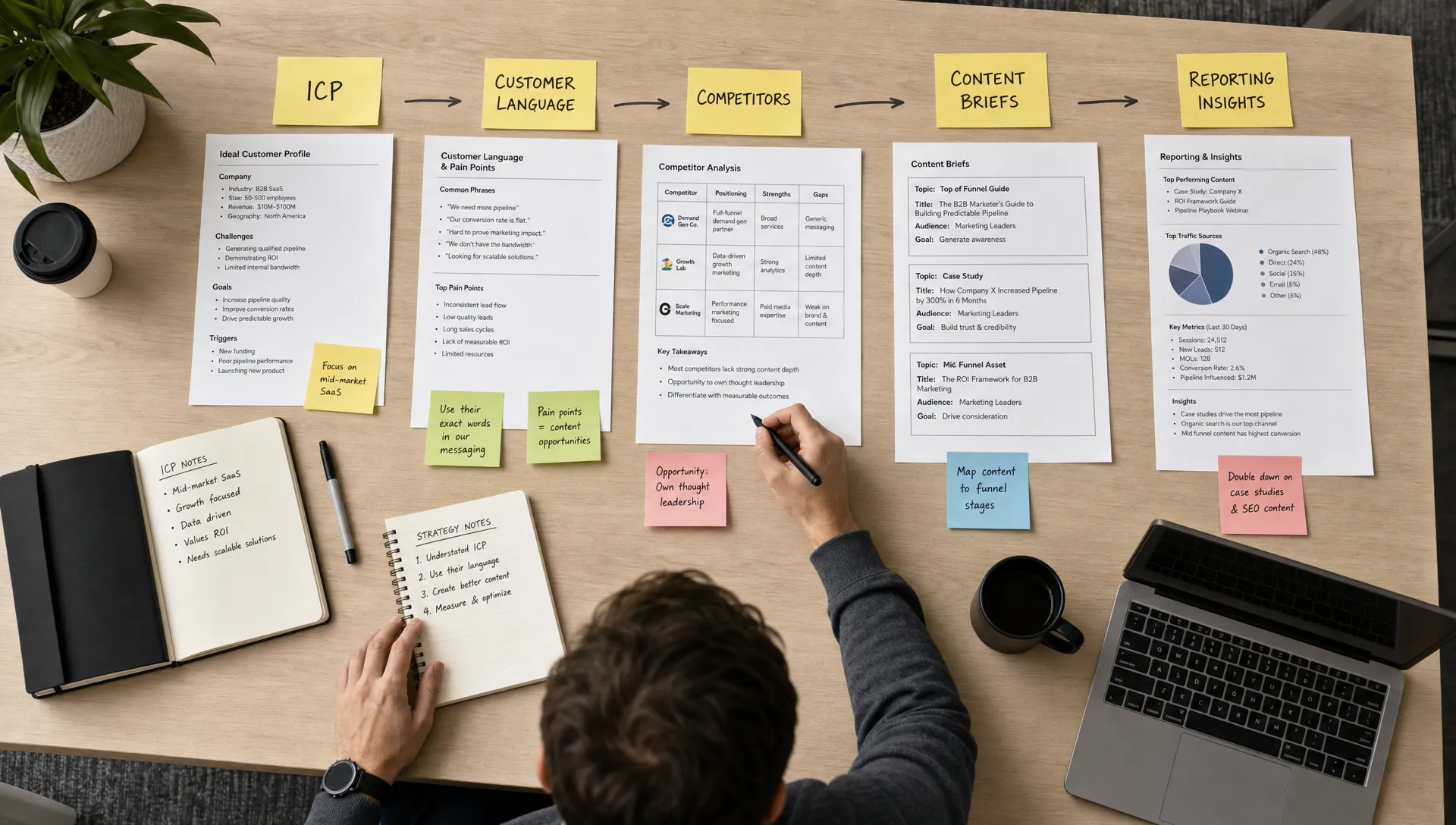
An automated intake research workflow can pull those inputs into a single client research brief. It can summarize the company, target audience, buying committee, sales motion, key offers, known objections, competitors, and proof points. It can also flag missing information before the team begins strategy work.
The automation should not decide the ICP for you. Instead, it should give your strategist a structured first pass and a list of gaps to resolve.
For example, an agency could trigger a research brief when a new client completes an onboarding form. The system could combine form answers, the client website, CRM notes, and discovery call transcripts into a standardized document. A strategist then reviews the brief, adds nuance, and approves it as the source of truth for the campaign.
That one approved brief can later feed messaging, content, ads, reporting, and account management.
2. Voice of customer mining
Voice of customer research is valuable because it captures how buyers actually describe their problems. It is also time-consuming, especially when the raw material is spread across sales calls, support tickets, reviews, testimonials, survey responses, and chat logs.
This is a strong workflow to automate because the AI does not need to invent anything. It can extract patterns from existing customer language.
A useful voice of customer workflow can identify repeated pains, desired outcomes, objections, trigger events, competitor mentions, and exact phrases worth reusing. It can also sort quotes by persona, funnel stage, product line, or campaign theme.
The human role is critical here. Someone still needs to decide which insights are representative, which quotes are safe to use, and which language should influence positioning. But the first-pass extraction can be automated, which means your team no longer starts every messaging project with a blank document.
One practical output is a living messaging bank. Instead of asking each strategist or copywriter to re-read raw transcripts, the team can search an approved library of customer language organized by topic.
3. Competitor and positioning monitoring
Competitive research is often treated as a one-time project, but markets move constantly. Competitors update pricing pages, shift messaging, launch new offers, publish comparison content, and change their ad angles.
The manual version of this workflow is unreliable. Someone remembers to check competitor sites before a strategy session, copies notes into a document, and the document slowly goes stale.
An automated competitor monitoring workflow can track selected public sources and summarize meaningful changes on a schedule. It can watch for new positioning claims, offer changes, case studies, landing pages, content themes, and messaging patterns. The output should be a concise change log, not a flood of raw screenshots or links.
This workflow is not about copying competitors. It is about helping your team spot shifts early and sharpen differentiation. A strategist should still decide what the change means, whether it matters, and how the client should respond.
| Workflow | What automation can do | What humans should own |
|---|---|---|
| ICP research | Gather intake inputs and draft a structured client brief | Validate positioning, segments, and strategic priorities |
| Voice of customer mining | Extract themes, objections, outcomes, and buyer language | Decide which insights are representative and usable |
| Competitor monitoring | Summarize public messaging and offer changes | Interpret threats, opportunities, and differentiation |
| Content research | Build briefs from search intent, customer language, and client POV | Shape the angle, argument, and quality bar |
| Reporting research | Pull performance context and draft insight summaries | Explain the business meaning and next move |
4. Search and content research briefs
Content research is one of the most common places agencies burn hours. Before a writer can produce anything useful, someone has to review the topic, search intent, target audience, current rankings, internal context, competitor angles, and the client’s unique point of view.
AI can help, but only if the workflow forces quality inputs.
A weak automation produces generic briefs that sound plausible but do not help the writer. A strong workflow combines search research, approved customer language, the client’s positioning, internal subject matter notes, and examples of what the brand does not want to say.
The output should give the writer a clear job: who the piece is for, what question it must answer, what angle to take, what evidence to include, what claims need review, and what the call to action should be.
This also reduces rework. When writers, editors, and strategists work from a better brief, fewer drafts come back misaligned. That is especially important for agencies where revisions quietly eat delivery margin.
5. Community and dark social research
Many high-intent buyer questions do not show up first in keyword tools. They show up in communities, niche forums, Reddit threads, LinkedIn comments, Slack groups, podcasts, and founder posts.
This kind of research is powerful because it reveals what people say before they are ready to talk to sales. The challenge is that it is messy, fast-moving, and hard to monitor manually.
Automation can help by discovering relevant conversations, clustering themes, summarizing recurring questions, and routing the best opportunities to the right person. For Reddit specifically, this guide to automating Reddit discovery, drafting, reuse, and measurement shows a practical workflow that keeps human judgment in the loop.
That last point matters. Community research should not become spam automation. The agency’s job is to learn from the market, identify authentic opportunities, and respond with credibility where appropriate. AI can surface the signal, but humans need to protect trust.
A strong community research workflow can feed multiple assets: sales enablement notes, FAQ sections, objection handling, campaign angles, webinar topics, and content briefs.
6. Reporting insight research
Most agencies already automate parts of reporting. The issue is that many reports still require manual explanation. Someone has to pull numbers, compare performance, remember what changed, connect results to recent work, and write the client-facing narrative.
This is not just reporting. It is research into what happened and why.
An automated reporting insight workflow can collect data from approved sources, compare it to the previous period, identify unusual movement, pull in campaign notes, and draft a first-pass summary. For example, it might highlight that conversions improved after a landing page change, or that cost per lead rose during a test with broader targeting.
The human reviewer should own the final interpretation. Performance data can be misleading without context, and agencies should be careful about overclaiming causation. But the automation can reduce the blank-page problem and help account managers deliver more consistent reporting narratives.
For agencies offering white-label reporting, this can also create a more reliable production system. The report still reflects expert judgment, but the repetitive assembly work is reduced.
7. Lead research and follow-up context
Research does not only support delivery. It also supports sales.
When a warm lead enters the pipeline, your team often needs context quickly: who they are, what company they work for, what they likely care about, whether they match your ICP, what triggered the inquiry, and what follow-up should happen next.
If that research happens manually, timing suffers. A lead waits. A sales rep skims the website. Someone forgets to check the CRM. The follow-up becomes generic.
An automated lead research workflow can create a short lead brief and route it to the right person. The brief might include firmographic context, source, likely need, relevant service line, recent interactions, and suggested next step. The key is not to remove the salesperson. The key is to give them context before the conversation starts.
This pairs naturally with a stronger follow-up system. If warm leads are slipping through the cracks, Archer Scaling AI has a separate guide on how B2B teams can stop losing warm leads by improving routing, timing, and response relevance.
How to implement research automation without creating chaos
The risk with AI operations is not that the first automation fails. The bigger risk is that the agency creates five disconnected automations that no one trusts, maintains, or reviews.
Start smaller.
Choose one research workflow that happens often and already has a clear output. Then define the operating rules before you build anything. What sources are allowed? What should the AI summarize? What should it never decide? Who reviews the output? Where does the approved version live? What downstream workflows depend on it?
A simple implementation sequence works well:
- Pick one repeated research workflow with obvious margin impact.
- Define the exact input sources and the exact output format.
- Create a human review step before anything becomes client-facing.
- Store approved research where the rest of the team can reuse it.
- Measure time saved, rework reduced, and quality issues caught.
The measurement step matters. Research automation should not be judged only by speed. Faster bad research creates more rework later. The better question is whether the workflow helps the team produce clearer briefs, stronger recommendations, faster responses, and more consistent delivery.
What to automate first if you run a B2B marketing agency
If you want the fastest practical win, start with the research workflow closest to a recurring delivery bottleneck.
If onboarding slows projects down, automate client intake and ICP brief creation. If content quality varies, automate voice of customer mining and content research briefs. If account managers spend too much time preparing reports, automate reporting insight drafts. If sales follow-up is inconsistent, automate lead research and routing context.
The best first workflow is not always the most impressive one. It is the one your team repeats every week, with enough structure to automate safely and enough impact to protect margin.
This is where research marketing workflows become more than productivity hacks. They become operating assets. Each approved brief, insight bank, competitor log, and reporting summary makes the next campaign easier to produce.
Frequently Asked Questions
What are research marketing workflows? Research marketing workflows are repeatable processes for gathering, organizing, analyzing, and applying market, customer, competitor, content, sales, or performance research. In an agency, they often support briefs, strategy, reporting, positioning, and follow-up.
Can AI fully automate marketing research? AI can automate parts of marketing research, such as collection, summarization, classification, and first-pass synthesis. It should not fully replace human judgment, especially for strategy, positioning, claims, compliance, and client-facing recommendations.
Which research workflow should an agency automate first? Start with the workflow that repeats often and creates the most delivery drag. For many B2B agencies, that is client intake research, voice of customer mining, content brief creation, reporting insight drafts, or lead research for sales follow-up.
How do you keep automated research accurate? Use approved sources, define clear output formats, require human review, store approved research in one place, and track quality issues over time. Avoid letting AI make unsupported claims or use unverified data in client-facing work.
Turn research into a margin-protecting system
Your agency does not need more disconnected AI experiments. It needs repeatable research systems that improve delivery quality without adding headcount.
Archer Scaling AI installs and runs AI-powered operations for B2B marketing agencies, including workflows for research, reporting, onboarding, content ops, CRM, and follow-up. The process starts with a paid Margin Teardown, with a roadmap and three automation moves, or it is on Archer.
If you want to see what an AI ops layer could look like inside your agency, start with Archer Scaling AI and review the actual system before you commit.