AI in Marketing: 9 Agency Workflows to Automate
Explore 9 agency workflows to automate with AI in marketing, from onboarding to reporting, so your team protects margin without more headcount.
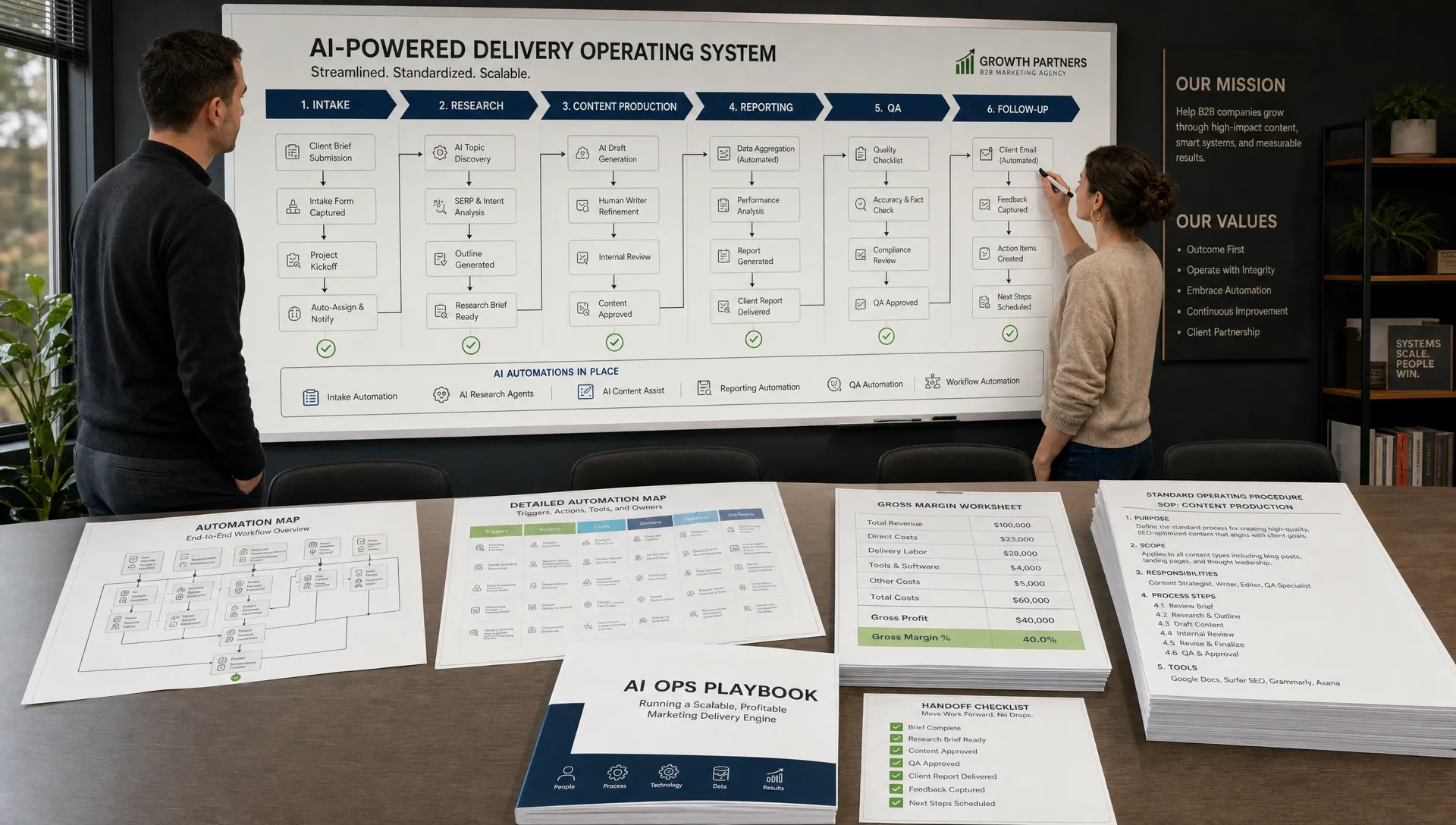
AI in marketing has moved past the novelty stage. Most agency teams have already tested AI for brainstorming, writing outlines, summarizing calls, or generating ad variants. The bigger opportunity now is less flashy and more profitable: using AI to remove the operational drag that eats delivery margin.
For B2B marketing agencies, margin usually leaks through repeated handoffs, inconsistent briefs, manual reporting, scattered client context, and senior people doing work that should have been systemized months ago. AI can help, but only when it is installed into the agency’s workflows, not treated as a browser tab everyone uses differently.
The goal is not to automate judgment, strategy, or client relationships. The goal is to automate the repetitive work around those things so your team has more time for the decisions clients actually pay for.
The best use of AI in marketing is workflow automation
Many agencies start with content generation because it is visible and easy to test. But content output is rarely the only bottleneck. A campaign still needs research, positioning, approvals, CRM updates, performance reporting, repurposing, and follow-up.
If those steps remain manual, AI-generated content can simply create more work downstream. More drafts to review. More assets to track. More reporting to explain. More variation without more control.
A better approach is to ask: where does your agency repeat the same operational motion every week?
That is where AI in marketing becomes an efficiency layer. It can ingest context, structure information, route tasks, draft repeatable deliverables, summarize messy inputs, flag missing data, and prepare client-ready outputs for human review.
If you are unsure where to start, Archer Scaling AI has a deeper breakdown on what a marketing agency should automate first, especially if your team is trying to protect delivery capacity before adding more headcount.
What makes a workflow a good automation candidate?
Not every workflow should be automated. High-stakes strategic decisions, sensitive client conversations, and creative direction still need experienced humans. The best candidates usually share four traits:
- The work happens frequently enough to justify systemizing it.
- The inputs are reasonably predictable, such as forms, call transcripts, CRM fields, or campaign data.
- The output follows a repeatable format, such as a brief, report, checklist, summary, or routing decision.
- A human can review the final result quickly before it reaches the client.
This matters because automation does not fix a broken process. It amplifies the process you already have. If your onboarding questions are unclear, an AI workflow will produce unclear onboarding summaries faster. If your CRM stages are messy, AI will struggle to route leads cleanly.
Start with the workflow, then add the model.
9 agency workflows to automate with AI
The workflows below are not theoretical. They are the everyday delivery motions where B2B agencies lose hours, create rework, and rely too heavily on senior staff to keep quality consistent.
| Workflow | Common manual bottleneck | What AI can automate | Human checkpoint |
|---|---|---|---|
| Client onboarding | Scattered intake notes | Summaries, gaps, kickoff prep | Account lead validates context |
| Research | Slow account and market scans | Structured briefs and source synthesis | Strategist confirms relevance |
| Voice of customer | Manual review of calls and reviews | Theme extraction and quote libraries | Copy lead approves messaging |
| CRM and lead routing | Missed updates and slow follow-up | Field cleanup, routing, next steps | Sales or account owner approves |
| Content ops | Blank-page briefs and inconsistent drafts | Briefs, outlines, repurposing | Editor reviews quality |
| Creative production | Repetitive variants | Format adaptation and versioning | Creative lead checks fit |
| Reporting | Manual data pulls and commentary | Draft narratives and anomaly flags | Strategist adds interpretation |
| QA and approvals | Feedback scattered across tools | Review checklists and status tracking | PM owns final approval |
| SOP and training | Knowledge trapped in people’s heads | Process drafts and onboarding docs | Ops owner finalizes standards |
1. Client intake and onboarding
Client onboarding is one of the easiest places for agencies to lose margin because it sets the quality bar for everything that follows. When intake lives across sales notes, forms, Slack threads, call recordings, and old proposals, the delivery team starts with incomplete context.
AI can turn onboarding into a structured workflow. It can summarize discovery calls, extract goals and constraints, identify missing assets, generate kickoff agendas, create internal handoff notes, and draft the first version of a project workspace.
The key is to avoid letting AI invent the client strategy. Use it to organize what the client already said, flag what is missing, and prepare the team to ask better questions. A strong onboarding automation reduces rework because strategists, creatives, and account managers are working from the same source of truth.
This is especially useful for agencies with recurring service packages, such as paid media management, SEO retainers, outbound campaigns, CRM implementation, or content programs. The more repeatable the engagement, the more valuable a structured onboarding system becomes.
2. ICP, account, and market research
Research is essential, but it often becomes a senior-team bottleneck. Before a campaign can launch, someone needs to understand the client’s audience, competitors, pain points, offers, buying triggers, and category language.
AI can speed up the first pass. It can synthesize website copy, sales materials, CRM notes, review sites, competitor pages, analyst snippets, and call transcripts into a structured research brief. For example, if an agency is building campaigns for a niche industrial client that sells premium shipping containers, AI can help organize product categories, customer use cases, buyer objections, and location-specific messaging themes before a strategist refines the angle.
This is not a replacement for strategic thinking. It is a way to stop wasting senior hours on collection and formatting. The human still decides what matters, what is differentiated, and what should shape the campaign.
For a more focused look at this category, see Archer Scaling AI’s guide to research marketing workflows you can automate now.
3. Voice of customer mining
Voice of customer work is one of the highest-leverage uses of AI in marketing because it improves messaging across ads, landing pages, email, sales enablement, and content.
The problem is that VOC data is messy. It lives in sales calls, customer interviews, support tickets, reviews, LinkedIn comments, survey responses, and onboarding notes. Most agencies know this data is valuable, but few have a consistent way to mine it every month.
An AI workflow can identify recurring pains, objections, desired outcomes, buying triggers, competitor comparisons, and exact customer phrases. It can sort quotes by persona, funnel stage, use case, or campaign theme. It can also update a reusable messaging library so copywriters are not starting from scratch each time.
The best agencies do not use this output blindly. They use it as raw material. A copywriter still needs to select the sharpest insight, remove noise, and shape the message into something compelling. But AI can turn hours of transcript review into a reviewable first pass.
4. CRM hygiene, lead routing, and follow-up
CRM work is rarely glamorous, but it directly affects revenue operations. Agencies that manage lead generation, lifecycle marketing, or CRM programs often spend too much time cleaning fields, checking statuses, assigning owners, and chasing follow-up.
AI can help standardize this work by classifying inbound leads, identifying missing fields, suggesting next steps, drafting follow-up emails, detecting stale opportunities, and routing records based on fit or urgency. It can also summarize recent account activity before a rep or account manager reaches out.
The important safeguard is permissions. AI should not be allowed to make irreversible changes without clear rules. For example, it can prepare a routing recommendation or draft a follow-up, but a human or approved automation rule should control final sends and critical CRM updates.
For agencies, this workflow is valuable because CRM sloppiness creates hidden delivery costs. Teams waste time asking who owns a lead, why a field is missing, or whether a campaign response was handled. A cleaner system reduces internal friction and improves client confidence.
5. Content briefs and content operations
AI-generated content gets a lot of attention, but content operations are where agencies often see better returns. The brief, not the draft, is usually where quality begins.
AI can turn research, keyword intent, audience notes, client positioning, previous campaign learnings, and internal style rules into a consistent brief. It can suggest outlines, identify missing proof points, propose FAQs, summarize SME interviews, and repurpose approved assets into email, social, landing page, or sales enablement formats.
This reduces the blank-page problem while keeping humans in control of strategy and voice. Editors can spend less time fixing structural issues and more time improving argument quality, specificity, and conversion intent.
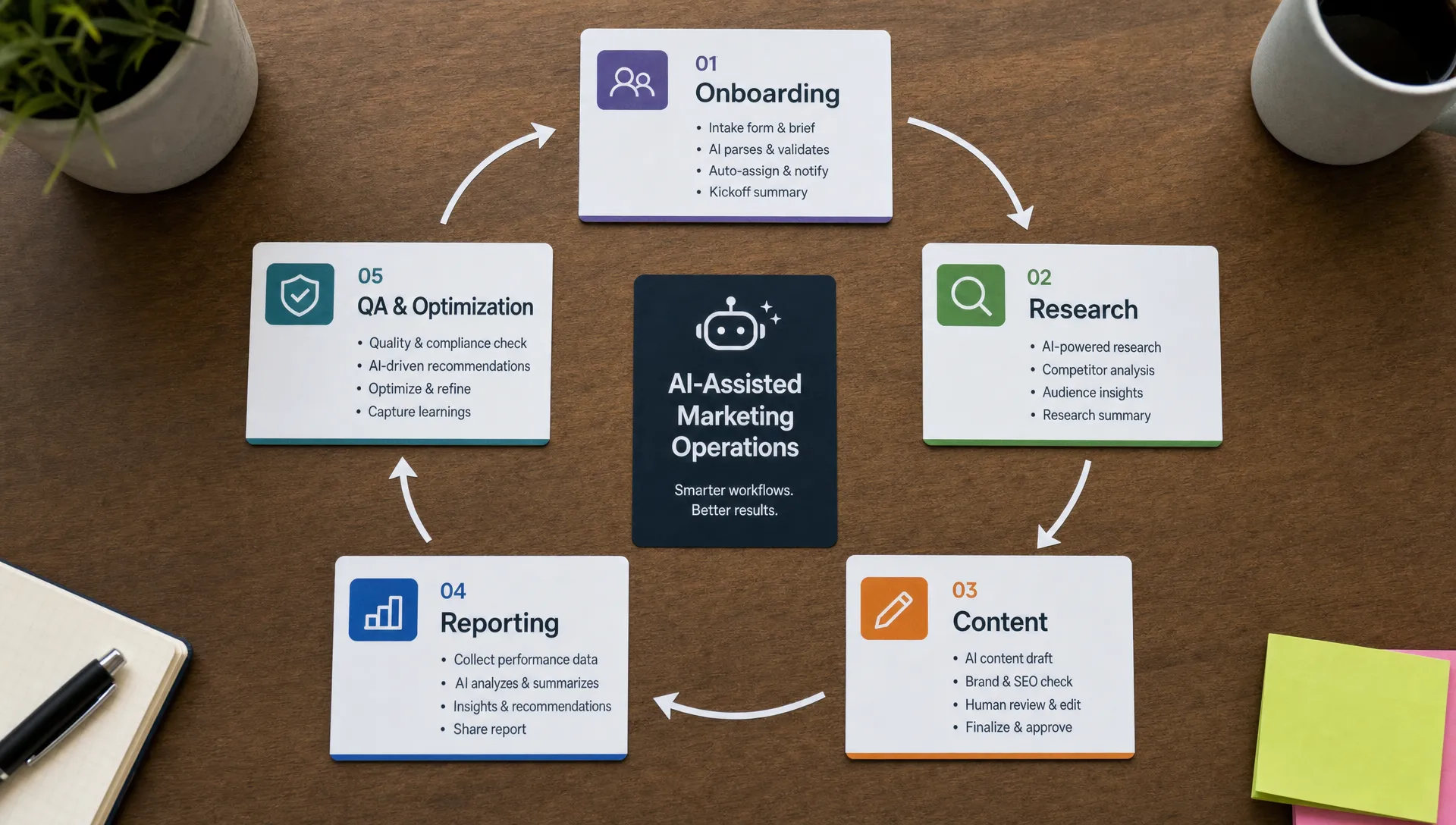
A strong content automation workflow should include quality gates. For example, AI can draft the first brief, but an editor should verify search intent, audience fit, claims, examples, and differentiation. Without that review layer, agencies risk publishing generic content faster.
6. Copy and creative production pipelines
Creative teams lose time when every asset requires the same manual formatting, adaptation, naming, and versioning work. A campaign might need LinkedIn ads, Google ad variations, landing page sections, nurture emails, sales one-pagers, and short-form social posts.
AI can support the production pipeline by creating controlled variants from an approved concept. It can adapt copy to different formats, rewrite headlines within brand constraints, generate design brief inputs, produce image prompt options, and organize versions by campaign, persona, or funnel stage.
This is different from asking AI to “make ads.” The better workflow starts with human-approved positioning and creative direction. AI then helps scale variations inside those boundaries.
For creative agencies, this can also reduce rework. When input quality, review criteria, and approval stages are standardized, fewer assets bounce back because of unclear expectations. Archer Scaling AI covers this broader operating principle in its article on agency marketing systems that protect your margin.
7. White-label reporting and performance narratives
Reporting is one of the most obvious workflows to automate because it is recurring, data-heavy, and often painfully manual. Many agencies still spend hours pulling screenshots, formatting slides, checking metrics, and writing the same explanation in slightly different words.
AI can help by preparing reporting narratives from structured data. It can summarize performance changes, flag anomalies, compare results against goals, draft client-friendly commentary, and generate internal notes for the strategist before the report is finalized.
The human role remains crucial. AI can identify that cost per lead increased or demo volume dropped, but it may not understand the client’s sales cycle, market conditions, campaign history, or internal politics. A strategist should add the “so what” and “now what.”
The best reporting automations create two outputs: an internal diagnostic view and a client-ready narrative. The internal view can be more technical, while the client version should be concise, clear, and tied to decisions.
8. Review, QA, and approval management
A surprising amount of agency margin disappears in review cycles. Feedback is scattered across email, comments, Slack, project management tools, and client calls. Then someone has to interpret it, consolidate it, assign changes, and make sure nothing is missed.
AI can assist by summarizing feedback threads, turning client comments into action items, checking whether requested edits were addressed, and preparing approval status updates. It can also run basic QA checks against a defined rubric, such as brand terms, required disclaimers, formatting rules, broken links, missing UTMs, or campaign naming conventions.
This workflow is not about replacing the project manager. It gives the project manager better visibility and fewer manual tasks. The PM still owns scope, priority, and client communication.
A practical first step is to create QA checklists for your most common deliverables. Once the standard is clear, AI can help apply it consistently.
9. SOP, training, and hiring support
Agency processes often live inside the heads of senior people. That works until the team grows, delivery volume increases, or a key person goes on vacation. Then quality becomes dependent on memory and tribal knowledge.
AI can help turn repeated work into usable documentation. It can convert recorded walkthroughs into SOP drafts, summarize Loom-style explanations, create role-specific onboarding guides, build checklists from completed projects, and draft hiring scorecards based on the actual work required.
This is especially valuable when combined with no lock-in documentation. If an automation system only works because one person understands it, the agency has created a new dependency. Good ops make the process clearer, not more mysterious.
For hiring, AI can help standardize interview questions, evaluate work samples against a rubric, and create training plans for new team members. Human judgment still matters, but the process becomes more consistent and less reactive.
How to prioritize these automations
If you try to automate all nine workflows at once, you will likely create more complexity than efficiency. Start where the cost of manual work is most visible.
A simple prioritization model is to score each workflow by volume, margin impact, process clarity, and risk. High-volume, low-risk, well-defined workflows usually come first. Reporting, onboarding, research summaries, and QA checklists are often strong starting points because the output is reviewable before it reaches the client.
| Priority factor | What to ask | Why it matters |
|---|---|---|
| Volume | Does this happen every week? | Frequent workflows create faster payback. |
| Margin impact | Does this consume expensive team time? | Senior bottlenecks are costly. |
| Process clarity | Do we know the correct input and output? | AI needs structure to perform reliably. |
| Risk | Can a human review before the client sees it? | Review gates protect quality and trust. |
The best first automation is usually not the most exciting one. It is the one your team already repeats, complains about, and fixes manually every week.
Common mistakes agencies make with AI automation
The first mistake is automating before standardizing. If every account manager handles onboarding differently, the automation will produce inconsistent outputs. Create the baseline process first.
The second mistake is skipping human review. AI should prepare, summarize, draft, classify, and flag. Humans should approve, interpret, and own client-facing judgment.
The third mistake is measuring the wrong outcome. A faster draft is not enough if it creates more editing time. Track cycle time, rework, handoff delays, client revisions, and senior team involvement. Those metrics reveal whether automation is actually improving delivery margin.
The fourth mistake is treating AI as a tool experiment instead of an ops layer. A few prompts in a shared document will not transform agency delivery. You need connected workflows, clear ownership, documentation, and review gates.
Frequently Asked Questions
What is the best workflow to automate first with AI in marketing? For most B2B agencies, the best first workflow is a recurring operational bottleneck with clear inputs and reviewable outputs. Client onboarding, reporting summaries, research briefs, and QA checklists are often better starting points than fully automated content creation.
Can AI replace agency strategists or account managers? No. AI is strongest when it supports strategists and account managers by handling repetitive preparation, summarization, formatting, and routing work. Humans still need to own judgment, client relationships, positioning, and final recommendations.
How do agencies keep AI-generated work from becoming generic? Agencies should use approved strategy, voice of customer data, brand rules, examples, and human review gates. AI should operate inside a defined system, not generate client-facing work from vague prompts.
How should an agency measure AI automation ROI? Track time saved, cycle time reduction, fewer revision rounds, faster onboarding, improved CRM completeness, lower reporting effort, and reduced senior-team involvement in repetitive tasks. The goal is better margin, not just more output.
Do small agencies need an AI ops layer? Small agencies often benefit the most because they have less capacity to absorb manual work. A lightweight AI ops layer can help standardize delivery, reduce founder bottlenecks, and create cleaner handoffs without hiring immediately.
Build the automations your margin actually needs
AI in marketing is most valuable when it is tied to the work your agency already sells and delivers. The agencies that win will not be the ones with the longest prompt library. They will be the ones with cleaner systems, faster handoffs, stronger QA, and less senior time trapped in repetitive delivery work.
Archer Scaling AI helps B2B marketing agencies install and run the AI ops layer behind those systems, including onboarding, research, reporting, CRM, content ops, and follow-up workflows. It starts with a paid Margin Teardown that identifies the highest-leverage automation opportunities and maps the first moves before you commit to a build.
If your team is busy but your margin is not improving, start with the operating system behind the work. You can explore how Archer Scaling AI approaches agency automation at archerscaling.ai.