Website design small business owners should prioritize first
Website design small business owners should start with mobile booking, clear services, trust, local details, and easy updates.

Good website design for small business owners is less about looking fancy and more about removing the small doubts that keep someone from booking.
If you run a waxing studio, skincare room, nail salon, lash business, gym, or solo service in Los Angeles, your website has a simple job. It should help the right person understand what you do, feel safe choosing you, and take the next step without needing to message you five times first.
That does not mean your site has to be huge. It does not mean you need every trend, animation, or page idea you have seen online. In fact, most small business websites work better when the first round is focused, clear, and easy to keep updated.
Here is what to prioritize first, especially if your current site feels outdated, slow on phones, or unclear.
Start with the one thing you want the site to help with
Before colors, fonts, photos, or page names, choose the main action you want visitors to take.
For most local service businesses, that action is booking an appointment. For some, it might be requesting a consult, joining a waitlist, calling the studio, or sending an inquiry. The point is to pick one main next step so the site can guide people there.
A common small business website mistake is giving visitors too many equally loud choices. A first-time skincare client should not have to decide between six buttons before they understand what to do. A personal training lead should not have to scroll through your entire story before finding how to schedule an intro session.
If your site has one main goal, the homepage becomes easier to plan. The top section can say what you do, who it is for, where you are, and how to book. The rest of the page can answer the questions that might stop someone from taking that step.
If this feels like the part that keeps getting messy, this guide on how to layout websites around one goal for better inquiries goes deeper into making that main action clear.
Make mobile booking easy before anything else
Most people checking out a local business are not sitting at a desk with time to study your site. They may be in their car before pickup, on a lunch break, between clients, or lying in bed comparing options.
That means your website has to work on a phone first.
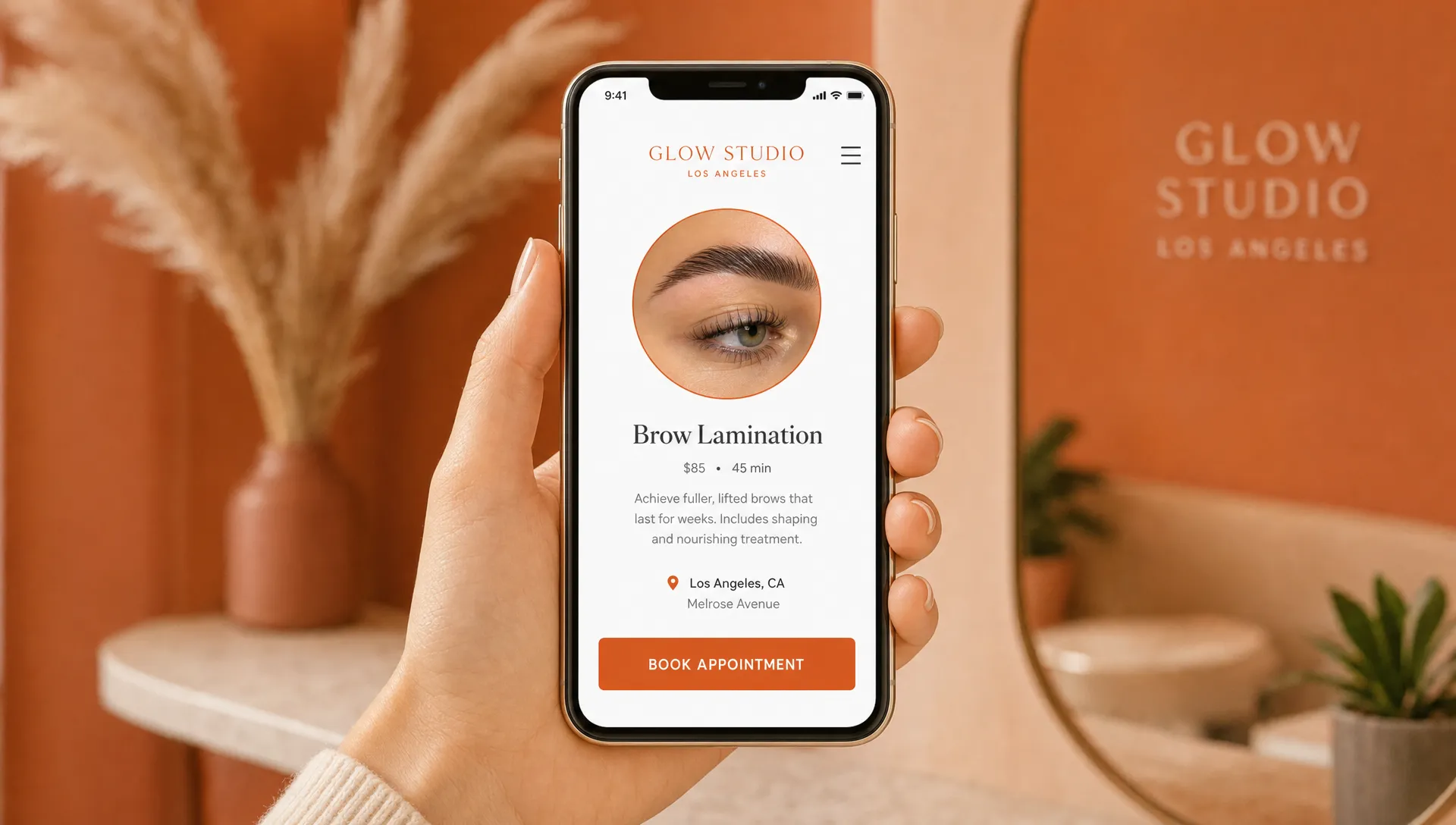
The booking button should be easy to see without hunting. Your service menu should be readable without pinching the screen. Your booking tool should open cleanly. If someone taps to book a wax, facial, lash fill, class, or intro call, the next step should feel obvious.
Test your website like a real client would. Open it on your own phone, not just your laptop. Try booking from the homepage. Try finding your address. Try checking your cancellation policy. Try using the form with one hand. If you get annoyed, your visitors probably do too.
A mobile-friendly site does not need to be plain. It just needs to respect the way people actually book. Big enough text, clear buttons, short sections, simple menus, and no popups covering the thing they came to do.
Explain your services like a client is brand new
You know your services because you do them every day. Your future client may not.
A client might not know the difference between a classic facial and a custom facial. They may not know if a lash fill is for two weeks or three. They may not know whether your gym offers open training, private sessions, small groups, or all three.
Clear service pages and booking pages save time for both sides. They reduce back-and-forth messages, help people choose the right appointment, and can lower the chance of someone booking the wrong thing.
At minimum, each important service should answer these questions:
- What is included?
- Who is it best for?
- How long does it take?
- What should a first-time client know?
- What is the starting price or price range, if you are comfortable sharing it?
- How does someone book or ask a question?
You do not have to write a novel. A few honest lines are usually enough. The goal is not to sound like a big brand. The goal is to sound helpful, calm, and clear.
| First priority | What to check | Why it matters |
|---|---|---|
| Main next step | Is booking, calling, or inquiring easy to find? | Visitors should not have to guess what to do next. |
| Mobile experience | Can someone read, tap, and book from a phone? | Many local clients check websites on phones. |
| Service details | Are services described in plain language? | Clear details reduce extra questions and wrong bookings. |
| Trust details | Are reviews, photos, policies, and location visible? | People need to feel comfortable before they book. |
| Local details | Is your city, neighborhood, or service area clear? | Nearby clients and Google need location context. |
| Easy updates | Can prices, hours, and services be changed without drama? | Outdated information creates confusion. |
Put trust details where people pause
Small business bookings are personal. Someone may be choosing who touches their skin, shapes their brows, trains their body, handles their nails, or helps with a service they have been nervous to try.
Trust is not just a pretty testimonial section at the bottom of the page. Trust is the information that helps someone feel ready.
For a beauty studio, that might mean real photos of the space, service examples shared with permission, aftercare notes, parking details, and policies. For a trainer, it might mean who you work with, where sessions happen, what a first visit feels like, and how you handle beginners. For a solo professional, it might mean a short bio, simple process steps, client results you are allowed to share, and a clear way to ask questions.
Policies matter too. Cancellation windows, late arrivals, deposits, refunds, and rescheduling notes should be written in a way that sounds firm but human. If you are drafting a client notice, complaint reply, or policy message and need help making it sound polished, a tool like LetterCraft AI can help you shape a clear professional letter before you send it or adapt it for your site.
The best trust details answer questions before someone has to ask. That can cut down on nervous texts, unclear expectations, and avoidable no-shows.
Help nearby clients and Google understand where you are
If you serve local clients, your website should make your location obvious.
This does not mean stuffing every Los Angeles neighborhood onto every page. It means being clear and accurate. If your studio is in Los Angeles, say so. If you serve a specific neighborhood, name it naturally. If clients come to a private suite, explain what they need to know before arrival. If parking is tricky, say that too.
Your name, address, phone number, hours, and booking details should match what people see on your Google Business Profile and other public listings. When those details are inconsistent, clients can get confused. It also makes your business look less cared for.
Getting found on Google is not only about keywords. It is also about having a website that clearly explains what you do, where you do it, and how people can work with you. A light search setup is often enough for a simple local service site: clear page titles, service names people actually search for, location wording that is true, and helpful content that matches your real business.
Keep the site small enough to update
A beautiful website can still become a problem if you cannot keep it current.
Small businesses change. Prices shift. Hours change. You add a service. You stop offering something. You move suites. You take a break. You open a few extra days before a holiday.
If every small edit feels hard, your site will slowly fall behind. And when visitors see old prices, expired announcements, broken booking links, or outdated photos, they may wonder what else is not current.
This is why simple structure matters. A smaller site with clear pages is often better than a large site you are afraid to touch. If your business mainly needs bookings, you may not need ten pages at the start. You may need a strong homepage, clear service page or booking page, contact details, policies, and enough trust-building content to help people decide.
For more on this side of the process, this article on website design small business owners can actually maintain is a helpful next read.
Let the extras wait
It is easy to spend the whole project on the fun parts. Brand colors, moving sections, custom icons, clever phrases, photo effects, and long about pages can all feel important.
Some of those things may be worth doing. They just should not come before the basics.
If the booking button is hidden, the service menu is confusing, or the site looks broken on a phone, a prettier animation will not fix the real problem. If your address is hard to find, a new font will not help a client arrive on time. If your policies are unclear, a larger photo gallery will not stop awkward conversations.
A good first version of your site should be useful before it is impressive. Once the booking path is clear, the site is mobile-friendly, and the main information is in place, then you can layer in more personality.
A simple first website plan
If you are starting from scratch or cleaning up an old site, think in sections instead of trying to plan a giant website all at once.
| Website section | What it should do |
|---|---|
| Top section | Say what you offer, who it is for, where you are, and how to book. |
| Services | Help visitors choose the right appointment or inquiry path. |
| Proof | Show reviews, photos, examples, or other real trust details you can share. |
| What to expect | Explain the first visit, process, prep, aftercare, or next steps. |
| Location | Give address, neighborhood, parking, studio access, or service area details. |
| Questions | Answer the common things people ask before booking. |
| Booking area | Repeat the main next step clearly near the end of the page. |
This order works because it follows how people decide. They first ask if they are in the right place. Then they want to know what is offered. Then they look for reasons to trust you. Then they need the practical details. Then they book.
You can adjust the order based on your business, but the general flow should feel natural.
What different small businesses should prioritize
The first priorities are similar across local service businesses, but the details change depending on what you offer.
| Business type | Website details to prioritize first |
|---|---|
| Waxing or skincare studio | First-timer comfort, service descriptions, prep and aftercare, booking link, location, policies. |
| Nail or lash salon | Service menu clarity, examples of work, fill or repair details, timing, booking link, care notes. |
| Personal trainer or gym | Training style, who sessions are for, location, intro call or trial details, schedule expectations. |
| Solo professional | Clear offer, short process, proof of experience, inquiry form, simple next step. |
| Creator with a service or offer | Sales page clarity, what is included, who it is for, payment or inquiry path, common questions. |
The pattern is simple. Put the client’s decision-making details first. Your website should make the next step feel easy, not make visitors work harder.
When to bring in a web designer
You can make many small improvements yourself, especially if your site is already built on a system you understand. Updating your service descriptions, checking your mobile booking path, and rewriting unclear buttons are good places to start.
It may be time to bring in help if your site is outdated, hard to edit, not working well on phones, or taking up too much of your time. It is also worth getting help if you are opening a new studio, changing your services, raising your prices, or trying to look more established online.
A designer should not just make the site pretty. They should help you decide what matters first, what can wait, and how the page should guide real clients toward booking.
Frequently asked questions
What should a small business website include first? Start with a clear main action, mobile-friendly booking, plain service descriptions, trust details, location information, and easy ways to contact or book. Those pieces help visitors understand and act without confusion.
Do I need a full website or just a booking page? It depends on your business. Some solo service providers can start with a strong booking page or one-page site. If you have several services, a team, a studio location, or a more detailed process, a small full site may be more helpful.
Should I show prices on my website? If your prices are set, showing them can reduce extra messages and help people decide faster. If pricing changes by client or service, a starting price, range, or explanation of how pricing works can still be useful.
How often should I update my small business website? Update it whenever your services, prices, hours, policies, location, or booking link changes. It is also smart to review the site every few months to make sure everything still feels accurate.
What makes a website feel trustworthy? Clear services, real photos, reviews or examples you have permission to share, accurate contact details, simple policies, and a working booking path all help a website feel more trustworthy.
Start with the pieces that get clients booked
Your website does not need to do everything on day one. It needs to make the right next step clear.
If you are a Los Angeles small business owner and your current site feels outdated, confusing, or hard to use on a phone, start with the basics that affect bookings first: clear message, easy mobile booking, service details, trust, local information, and simple updates.
Written by Raine Soriano, founder of Archer Scaling AI — where he builds AI automations for B2B marketing agencies.